
easy-builder
RunMyProcess Easy Builder
No-Code Platform BPM Workflow Design Studio
JQuery
SaaS
BPM
Drag-and-Drop
Designed and built a no-code drag-and-drop application builder that reduced custom form development time from 4 weeks to 1 hour. Easy Builder enabled non-technical presales professionals to create production-ready business applications during client meetings, becoming a key market differentiator for RunMyProcess.
Jun 1, 2017
Role
Duration
Team
Tech
The Problem
RunMyProcess sold BPM (Business Process Management) software to enterprise clients. The sales cycle had a critical bottleneck:
Presales demonstrations required custom development:
Creating demo applications took 4+ weeks of developer time
Presales team couldn't customize demos for client-specific needs
Lost deals because competitors showed working prototypes faster
Developers became bottleneck for sales team
The opportunity: If presales could build applications themselves, RunMyProcess could:
Prototype client solutions during meetings
Iterate in real-time based on feedback
Close deals faster with working demos
Free developers to focus on product features
The constraint: Presales professionals weren't developers. The tool had to be:
Visual and intuitive (drag-and-drop)
No code required
Production-quality output
Fast enough to use in client meetings
The core challenge: How do you build a tool that lets non-developers create enterprise applications without writing code?
My Approach
1. User Research with Presales Team
Spent 2 weeks shadowing presales:
Observed client demos and pain points
Identified most common application patterns
Documented what presales needed vs. what developers built
Created personas for "citizen developers"
Key insight: Presales thought in terms of "what users see" (forms) and "what happens" (workflows), not technical implementation.
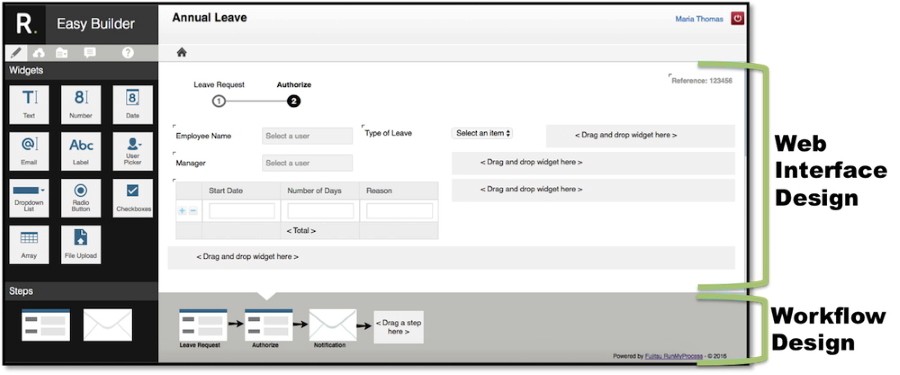
2. Two-Pane Design Philosophy
Designed around the mental model of presales users:
Left pane: What users see (Interface Designer)
Visual form builder
Drag widgets onto canvas
Configure appearance
Right pane: What happens (Workflow Designer)
Visual workflow builder
Connect process steps
Define business logic
This matched how presales described applications: "Users fill out this form, then this approval happens."
3. Widget-Based Architecture
Created a library of pre-built widgets:
Text inputs, dropdowns, date pickers
Tables, grids, file uploads
Custom components for common patterns
Each widget:
Configurable via properties panel
Generates clean HTML/CSS
Connects to workflow engine
Validates data automatically
4. Iterative Prototyping
Built 5 increasingly complex prototypes:
Prototype 1: Static mockup (validate concept)
Prototype 2: Basic drag-and-drop (prove technical feasibility)
Prototype 3: Form builder only (test with presales)
Prototype 4: Add workflow engine (validate end-to-end)
Prototype 5: Production MVP (beta with real clients)
The solution
Interface Designer
Visual form builder with drag-and-drop interaction:
Widget Library (left sidebar):
Input widgets (text, number, date, dropdown)
Layout widgets (container, tabs, accordion)
Display widgets (label, image, table)
Advanced widgets (file upload, signature, maps)
Design Canvas (center):
Drop zone for widgets
Visual editing (resize, reposition)
Property inspector for configuration
Preview mode to test behavior
Properties Panel (right):
Widget-specific configuration
Data binding to workflow
Validation rules
Styling options
Workflow Designer
Visual workflow orchestration connecting process steps:
Workflow Steps:
Human tasks (approvals, reviews)
Service calls (REST APIs, database queries)
Business rules (conditions, calculations)
Notifications (email, SMS)
Visual Flow:
Drag workflow steps onto canvas
Connect with arrows to define sequence
Configure step parameters
Test workflow execution
Two-Way Binding
The magic: changes in Interface Designer automatically reflected in Workflow Designer and vice versa:
Add form field → Available in workflow as variable
Create workflow output → Can be displayed in form
Modify data model → Both views update
JSON-Based Persistence
Applications saved as JSON configuration:
This meant:
Applications are data, not code
Easy to version control
Export/import between environments
Extend via configuration, not custom development
Technical Implementation
Architecture Evolution
Phase 1: jQuery (2012-2013)
Started with jQuery and jQuery UI
Drag-and-drop with jQuery UI Sortable
DOM manipulation for rendering
Why jQuery initially:
Fast to prototype
Mature drag-and-drop libraries
Team expertise
Why we migrated:
jQuery couldn't scale to complex applications
DOM manipulation became unmaintainable
State management was chaotic
Performance issues with large forms
Phase 2: React Migration (2014)
Rebuilt with React and Redux
Component-based architecture
Declarative rendering
Predictable state management
Why React:
Component model aligned with widget architecture
Virtual DOM solved performance issues
Redux made state predictable
Easier to test and maintain
Widget Architecture
Every widget followed this pattern:
Widget Registry:
Central registry of available widgets
Widgets self-describe their properties
Drag-and-drop creates widget instances
Properties panel generated from widget schema
Drag-and-Drop Implementation
Used HTML5 Drag & Drop API with React:
Challenges:
HTML5 drag-and-drop API is inconsistent across browsers
Had to add polyfills for IE support
Touch devices required separate implementation
State Management with Redux
Application state structure:
Impact & Results
Quantitative Impact
4 weeks → 1 hour development time
75% reduction in custom application development
Presales became self-sufficient
Developers freed for product work
100+ applications built with Easy Builder in first year
Customer onboarding applications
Approval workflows
Data collection forms
Internal tools
50% increase in presales productivity
More demos per week
Faster iteration with clients
Higher close rates
4 weeks faster sales cycles
Working prototypes in first meeting
Real-time customization during demos
Client confidence from seeing working software
Qualitative Impact
For presales:
Empowerment to create without developers
Confidence to promise custom solutions
Ability to iterate with clients in real-time
For clients:
Saw working software immediately
Could request changes during meetings
Confidence RunMyProcess understood their needs
For developers:
No more rushed demo requests
Focus on product features
Created reusable widgets used by presales
For the company:
Market differentiation ("build apps in minutes")
Competitive advantage in sales
New revenue from citizen developer market
Key Learnings
What Worked
User research with presales paid off The two-pane mental model came from observing presales. Building what they described, not what we assumed.
Widget abstraction was right level Not too low-level (code), not too high-level (templates). Widgets gave flexibility with guardrails.
React migration was worth the pain Migrating mid-project was risky but necessary. React's component model was perfect for widgets.
JSON persistence was genius Applications as data meant we could version, export, extend without code changes.
What I'd Do Differently
Start with React We knew jQuery wouldn't scale but started there anyway for speed. Starting with React would have saved the migration pain.
More automated testing We relied too much on manual testing. Automated widget tests would have caught regressions faster.
Better widget documentation Presales figured out widgets through trial and error. Better docs and tutorials would have accelerated adoption.
Performance optimization sooner Large forms were slow. Should have profiled and optimized rendering earlier.
Challenges Overcome
Balancing power vs. simplicity: Presales wanted easy tools; developers wanted flexibility. Widgets struck the right balance.
Browser compatibility nightmares: IE8/9 support was brutal. Polyfills and progressive enhancement saved us.
Managing scope creep: "Just add this widget" requests were constant. Widget registry architecture made it manageable.
Key Takeaway
No-code tools succeed when they match users' mental models. Easy Builder worked because it reflected how presales thought about applications (forms + workflows), not how developers build them (code). The widget architecture provided the right abstraction layer, powerful enough for complex apps, simple enough for non-developers. This case study demonstrates product ownership, technical architecture decisions (jQuery → React migration), and building for non-technical users.